<?xml version="1.0" encoding="utf-8"?><feed xmlns="http://www.w3.org/2005/Atom" ><generator uri="https://jekyllrb.com/" version="3.10.0">Jekyll</generator><link href="https://njm08.github.io/feed.xml" rel="self" type="application/atom+xml" /><link href="https://njm08.github.io/" rel="alternate" type="text/html" /><updated>2025-10-22T13:05:37+00:00</updated><id>https://njm08.github.io/feed.xml</id><title type="html">The Software Architect’s Compass</title><subtitle>A blog about software architecture and machine vision projects.</subtitle><author><name>Niklas Meier</name></author><entry><title type="html">Neptune’s Eye: First training</title><link href="https://njm08.github.io/2025/10/21/NE-First-Training.html" rel="alternate" type="text/html" title="Neptune’s Eye: First training" /><published>2025-10-21T00:00:00+00:00</published><updated>2025-10-21T00:00:00+00:00</updated><id>https://njm08.github.io/2025/10/21/NE-First-Training</id><content type="html" xml:base="https://njm08.github.io/2025/10/21/NE-First-Training.html"><![CDATA[<h2 id="introduction">Introduction</h2>

<p>After collecting a dataset, it is time to train the object detection model. I am using the YOLO11 model from <em>Ultralytics</em>.
The model is already pre-trained on the large <em>COCO</em> dataset and has already learned generic image features.
Therefore, fine-tuning only requires a much smaller dataset to learn new classes.</p>

<h2 id="goal">Goal</h2>

<p>Train a first prototype to get a feel of the performance.</p>

<p>-How good does the boat and buoy detection work with actual images and videos taken from the sailboat?</p>

<h2 id="challenges">Challenges</h2>

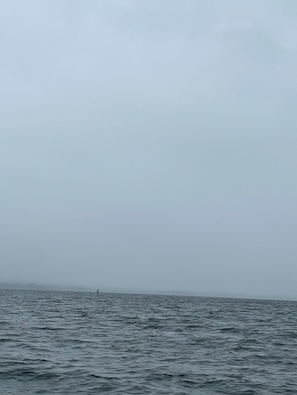
<p>One challenge in the domain of sailing is the different and most of the times not optimal lighting:</p>

<ul>
  <li>Reflections: Sunlight reflections on the ocean (glare) can saturate parts of the image.</li>
  <li>Low contrast: Haze, fog or cloudy days result in soft edges and low contrast.</li>
  <li>Variable illumination: Lighting intensity varies greatly during the day and with the weather.</li>
</ul>

<p>Another challenge is the small size of the objects:</p>

<ul>
  <li>Objects are often far away with few pixels.</li>
  <li>Buoys are small and hard to distinguish from the background or the ocean.</li>
</ul>

<p><img src="/docs/assets/images/buoy_low_lighting.jpeg" alt="Buoy on horizon" /><br />
<em>Hardly visible buoy on the horizon</em></p>

<h2 id="training">Training</h2>

<h3 id="hardware">Hardware</h3>

<p>The YOLO11 model is trained locally on the NVIDIA Jetson Orin Nano. The GPU computing power is sufficient for a reasonable training time in the range of several hours.
However, the memory is limited to 8 GB. For the YOLO11 small model, it is only possible to train with a maximum batch size of 3.</p>

<h3 id="parameters">Parameters</h3>

<ul>
  <li>Low learning rate = 0.001: To preserve pretrained features and prevent <em>catastrophic forgetting</em></li>
  <li>Starting with 50 epochs for first test</li>
  <li>Increased to 500 epochs in a second run</li>
</ul>

<h2 id="result">Result</h2>

<h3 id="test-on-real-videos">Test on real videos</h3>

<ul>
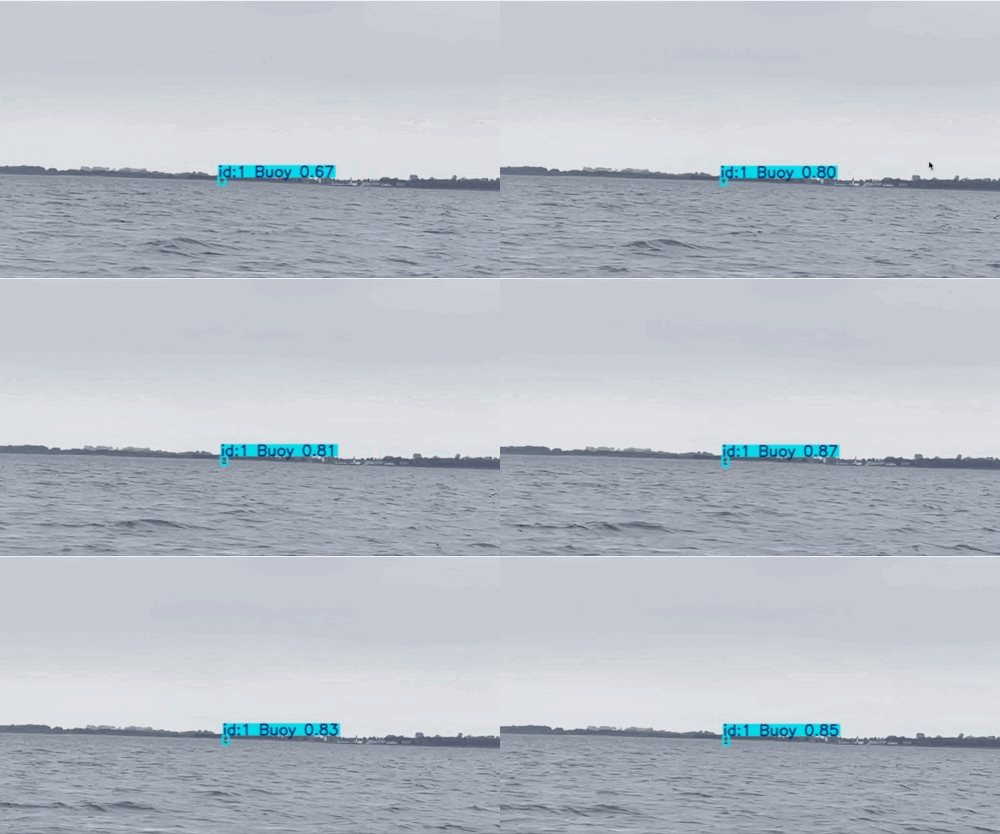
  <li>Buoy detection exceeds expectations: Reliable detection even in difficult lighting and with small object size</li>
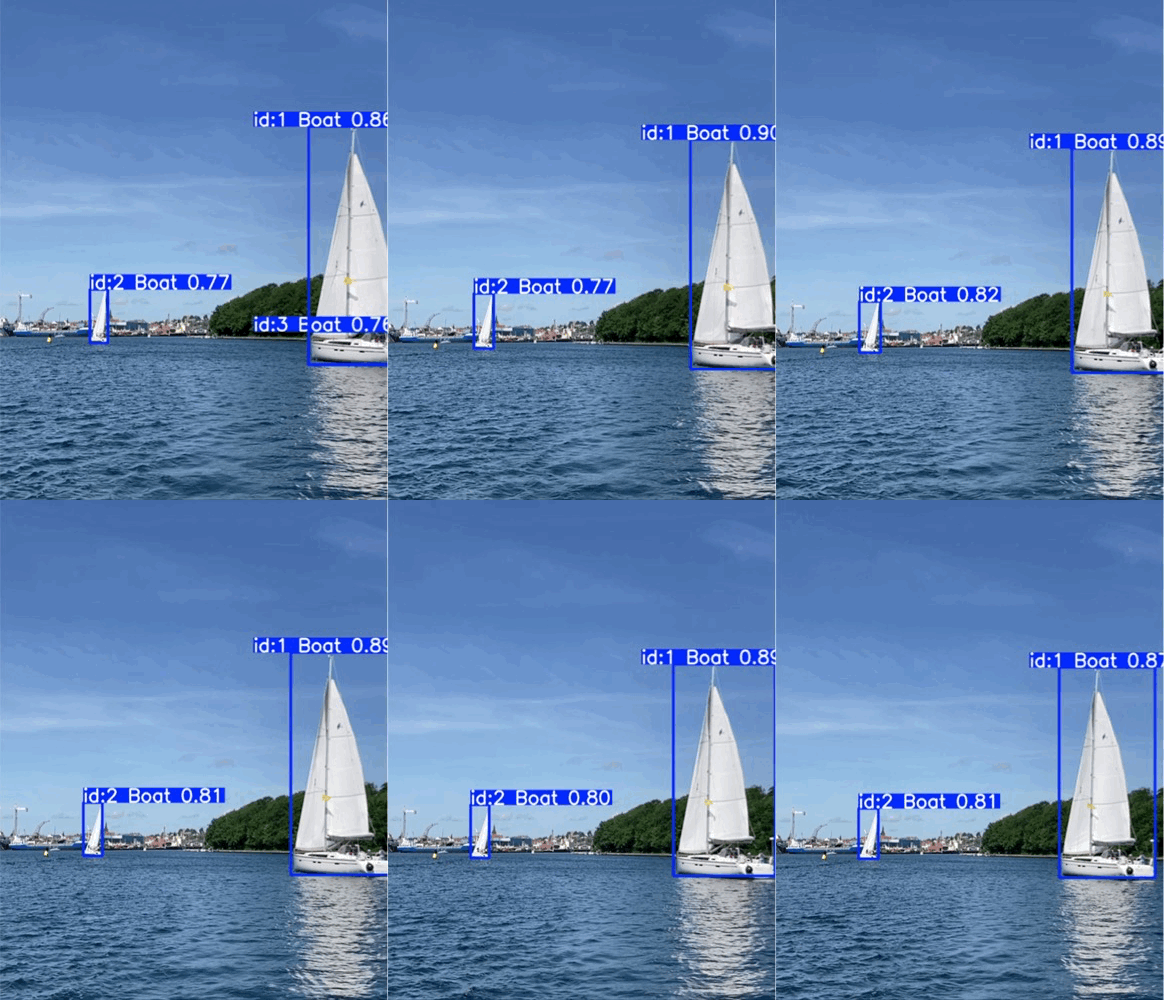
  <li>Boat detection is not forgotten: No catastrophic forgetting of already trained boat detection</li>
</ul>

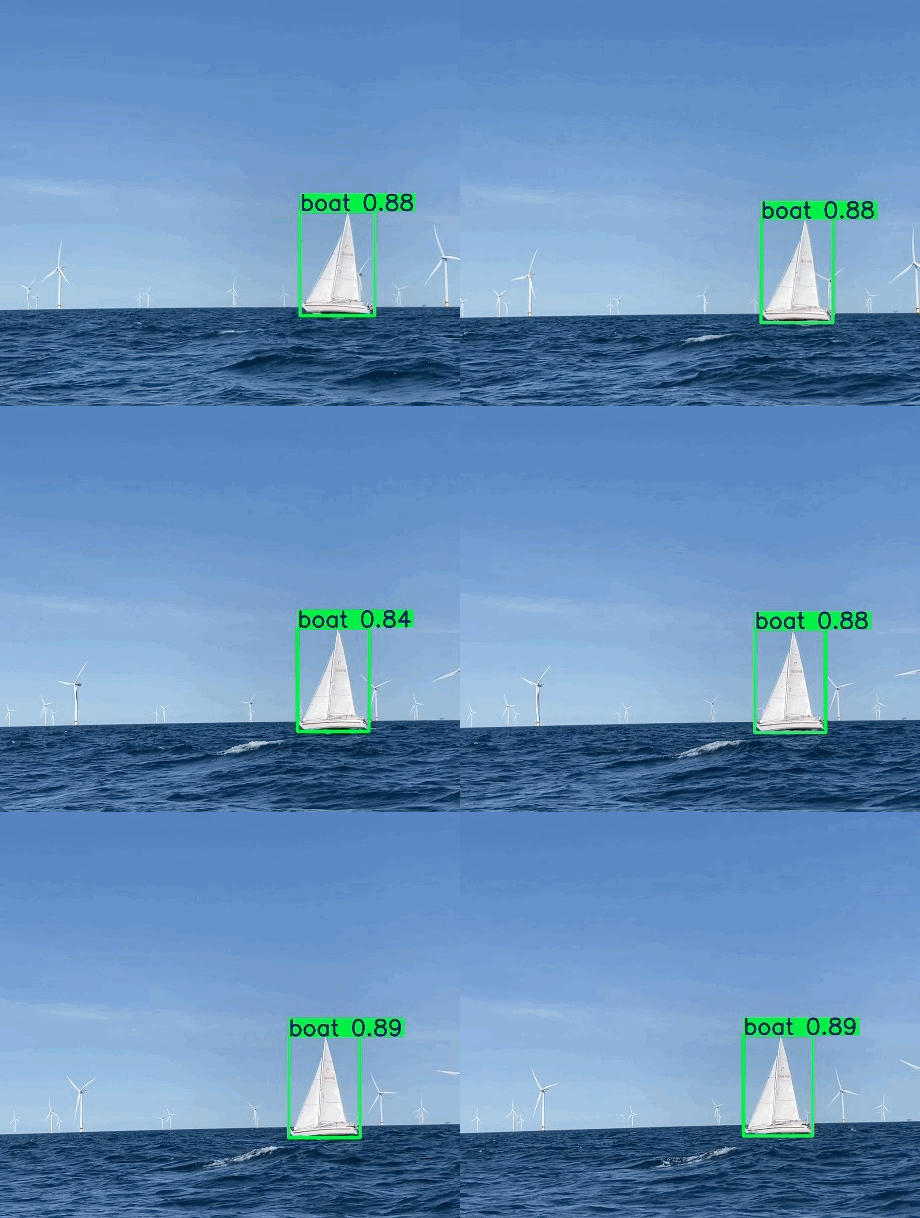
<p><img src="/docs/assets/images/detection_buoys_one.gif" alt="Buoy detection" /> <img src="/docs/assets/images/detection_sailboat_svendborg.gif" alt="Sailboat detection" /><br />
<em>Stable detection of a buoy and sailboats</em></p>

<h3 id="metrics">Metrics</h3>

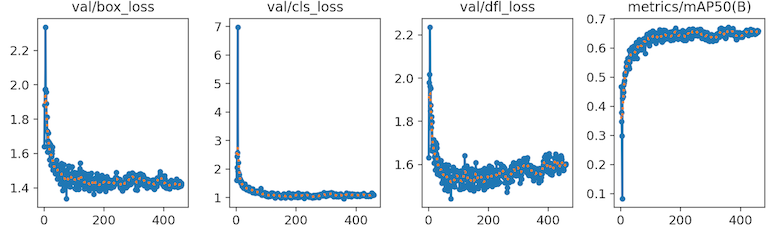
<p>This is just a quick look at the training metrics:</p>

<ul>
  <li>The metrics such as <em>box loss</em> and <em>mean average precision</em> (<em>mAP</em>) flatten out after about 100 epochs</li>
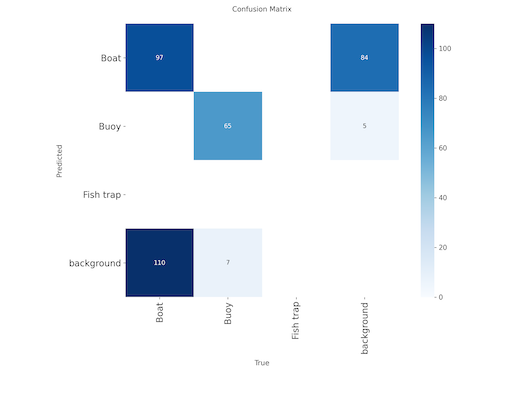
  <li>The confusion matrix shows that boats and the background are often misclassified. This will need to be looked at more closely when I have better data for training.</li>
</ul>

<p><img src="/docs/assets/images/validation_metrics_500.png" alt="Validation metrics" /><br />
<em>Metrics do not improve with more epochs</em></p>

<p><img src="/docs/assets/images/confusion_matrix_500.png" alt="Confusion matrix" /><br />
<em>Boats and background misclassified</em></p>

<h2 id="outlook">Outlook</h2>

<p>In the next steps I will need to collect more domain specific data. The domains main characteristics:</p>

<ul>
  <li>Sailboat perspective: Objects are usually small and on the horizon with a lot of water between.</li>
  <li>Varying and often poor lighting of the images.</li>
  <li>Varying background: When sailing into the open ocean, the background is uniform. When sailing towards land the background is noisy.</li>
</ul>

<p><strong>Next steps:</strong></p>

<ul>
  <li>Experimenting with hyperparameters such as batch size, learning rate and image augmentations.</li>
  <li>Evaluating model performance on a test set that represents the domain well.</li>
  <li>Setting up automated model training and performance monitoring (MLOps).</li>
</ul>]]></content><author><name>Niklas Meier</name></author><category term="Other" /><summary type="html"><![CDATA[Introduction]]></summary></entry><entry><title type="html">Neptune’s Eye: Hoisting the sails to get data</title><link href="https://njm08.github.io/2025/10/16/Neptune-Eye_Getting_training_data.html" rel="alternate" type="text/html" title="Neptune’s Eye: Hoisting the sails to get data" /><published>2025-10-16T00:00:00+00:00</published><updated>2025-10-16T00:00:00+00:00</updated><id>https://njm08.github.io/2025/10/16/Neptune%20Eye_Getting_training_data</id><content type="html" xml:base="https://njm08.github.io/2025/10/16/Neptune-Eye_Getting_training_data.html"><![CDATA[<h2 id="introduction">Introduction</h2>

<p>Introducing <strong>Neptune’s Eye</strong>. This is the beginning of a new open source project. The goal is to develop a real-time object detection system that detects hazards such as other boats, buoys or fishing traps for safer sailing.</p>

<p><strong>Step 1: Collecting Data</strong>
When building an object detection model, running the actual training is the easy part. The hard part is acquiring a
dataset that fits your application. The quality of the data influences the quality of the detection significantly.
Finding a dataset for cats, dogs or cars is easy. But finding data for detecting buoys, boats, fishing traps and other
hazards that we run into during sailing is not trivial.</p>

<p><img src="/docs/assets/images/neptune_eye_ai.png" alt="Neptune Eye" /><br />
<em>Neptune’s Eye AI generated image</em></p>

<h2 id="goal">Goal</h2>

<p>Acquire good data to tain the model. In the first iteration the model should detect ships, buoys and maybe fishing traps.
These classes present the main dangers at see. In the future, different ship classes like sailboats, small boats or freighters can trained, as well as new classes like light houses and wind farms.</p>

<h2 id="getting-data">Getting data</h2>

<h3 id="public-data">Public data</h3>

<p><em>Roboflow</em> is a widely used plattform for vision data sets. I could not find a dataset that exactly fits my needs.
This means I had to create my own dataset from different sources. I could find a good dataset for buoys with about 300 images. This is not a lot but should be enough for initial testing. Buoys vary greatly in shape so a larger dataset will
probably be necessary in the future.<br />
The Yolo11 object detection was initially trained on the <em>COCO</em> dataset. Since the detection of boats already worked very well with this pretrained model, I decided to take boat images from the <em>COCO</em> dataset. I manually went through the first
couple of hundred of boat images to find those that match the application best. For Neptune Eye, boats will usually appear far away and be quite small. There are hopefully no close ups of boats, since this means a crash.</p>

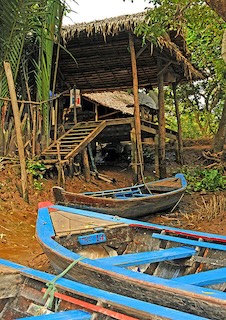
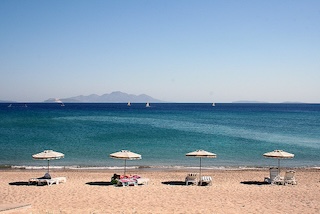
<p><img src="/docs/assets/images/coco_boat_1.jpg" alt="COCO Boat 1" /><img src="/docs/assets/images/coco_boat_2.jpg" alt="COCO Boat 2" /><br />
<em>COCO images of boats vary. Close-up on land or far away on the horizon</em></p>

<h3 id="hoisting-the-sails">Hoisting the sails</h3>

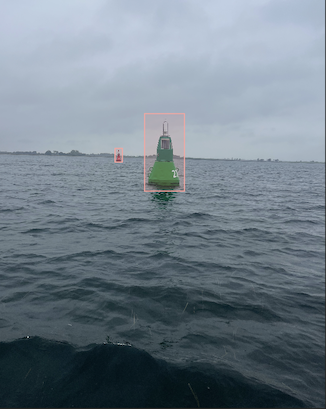
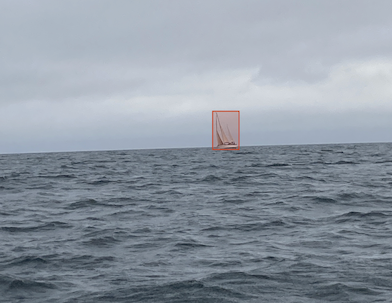
<p>The best data however, is the one taken directly from the boat. While sailing in October I took as many pictures of buoys and sailboats that I could get in a 4 days of sailing. This resulted in about 60 images of mostly buoys.
I used Label Studio to easily label these images manually. This worked fine for this small dataset. In the future I plan on using semi-automated labelling.</p>

<p><img src="/docs/assets/images/buoy_label_studio.png" alt="Buoy" /> <img src="/docs/assets/images/sailboat_label_studio.png" alt="Sailboat" /><br />
<em>Buoy and sailboat image taken from sailboat</em></p>

<h2 id="result">Result</h2>

<p>As a result I created a data set with about 900 boat and 300 buoy images. I only have a handful of fishing trap fotos and could not find anything on the internet.</p>

<h2 id="summary">Summary</h2>

<p>Collecting data is a more challenging and time consuming task. Since it is winter and the boat is on land
I will not be able to collect more <em>real</em> data until next spring. For getting more images of the tricky fishing traps
I will need to be more creative. Scraping the internet or AI generated images for example.
The dataset is currently not well balanced. Lets see how it works out in the next blog.</p>]]></content><author><name>Niklas Meier</name></author><category term="Other" /><summary type="html"><![CDATA[Introduction]]></summary></entry><entry><title type="html">Documenting Architecture the Right Way</title><link href="https://njm08.github.io/2025/10/03/Architecture_for_the_dev_team.html" rel="alternate" type="text/html" title="Documenting Architecture the Right Way" /><published>2025-10-03T00:00:00+00:00</published><updated>2025-10-03T00:00:00+00:00</updated><id>https://njm08.github.io/2025/10/03/Architecture_for_the_dev_team</id><content type="html" xml:base="https://njm08.github.io/2025/10/03/Architecture_for_the_dev_team.html"><![CDATA[<h2 id="introduction">Introduction</h2>

<p>Unfortunately, there is no blueprint on how to document architecture. If so, we would just all do it the same way.
Too often the architecture documentation is not actually read, used or understood by anyone.
This can lead to a slow erosion of the software, by more and more spaghetti finding its way into the code.</p>

<p>The most common problems I see, when documenting code are:</p>

<ul>
  <li>The documentation is not up-to-date. It was done in the beginning of the project and then left to erode.</li>
  <li>The documentation is too large and overwhelming. You cannot find what you are looking for.</li>
  <li>The documentation is not clear:
    <ul>
      <li>Boxes are connected by lines and arrows but no one knows what they mean. The relationships between the components is unclear.</li>
      <li>Boxes have colors but the colors are not explained.</li>
    </ul>
  </li>
  <li>The documentation is hard to find. It might be in some Enterprise Architect project that no one has access to.</li>
  <li>There is no documentation. :D</li>
</ul>

<p><img src="/docs/assets/images/yoda_documentation.jpg" alt="YODA and documentation" /></p>

<h2 id="goal">Goal</h2>

<p>Simple tips to help create a architecture documentation that the development team benefits from.</p>

<h2 id="architecture-for-the-development-team">Architecture for the development team</h2>

<p>The architecture is not for audits, management or future historians. It is for the people who are building and maintaining the system now. Write it for the development team. Use the documentation when talking about software all the time.</p>

<h2 id="architecture-naming-consistent-with-code">Architecture naming consistent with code</h2>

<p>The naming in the documentation must match the naming of files and folders in the code.
This way your architecture is found in the actual product (the code).
Everyone <strong>speaks the same language</strong> reducing confusion and expensive misunderstandings. This language should be used in meetings, in the code,
and in your nice architecture pictures.</p>

<h2 id="document-important-decisions">Document important decisions</h2>

<p>Document important technical decisions, why they were made and what the alternatives were.
A year later some topics might come up again and you will probably have forgotten the exact reasons.</p>

<h2 id="balancing-just-enough">Balancing just enough</h2>

<p>The goal is not to document everything. Document just enough for developers to understand the building blocks and how they work together.
Be careful when documenting in too much detail. The documentation is more likely to get outdated quicker.<br />
<em>UML</em> is great, since it is a standardized way to document architecture. However, this is also its weakness. It is easy to forget what the different
arrows mean, if you don’t use it regularly. It is also very detailed and quickly does not match the code anymore.<br />
Just remember, the documentation is to help your team understand the system.</p>

<h2 id="collaborative-and-living-document">Collaborative and living document</h2>

<p>The architecture documentation must evolve with the code. It is a living part of a product, just like the code.
It should be owned and updated by the team.</p>

<h2 id="visual-and-clear">Visual and clear</h2>

<ul>
  <li>Draw simple diagrams. Not every part of the software needs to be in the diagram.<br />
Every line and every box should be labeled. If boxes have different colors, a legend needs to explain these colors.</li>
  <li>Use hierarchical diagrams. Start from a top level view and then zoom into each of the components.</li>
</ul>

<h2 id="c4-and-arc42">C4 and arc42</h2>

<p>The <a href="https://c4model.com">C4 model</a> offers a great visual guideline and the <a href="https://arc42.org/overview">arc42 template</a> a textual guideline.
Use these two together and adapt them for your project.</p>

<h2 id="summary">Summary</h2>

<p>When you treat documentation as a <strong>living</strong>, <strong>developer-first</strong> artifact, it stops being a chore and becomes a practical tool for communication, alignment, and onboarding.</p>]]></content><author><name>Niklas Meier</name></author><category term="Other" /><summary type="html"><![CDATA[Introduction]]></summary></entry><entry><title type="html">YOLO11 Inference on MacBook Air M1 vs. NVIDIA Jetson Orin Nano</title><link href="https://njm08.github.io/2025/09/26/Yolo11_Nvidia_Jetson_and_M1.html" rel="alternate" type="text/html" title="YOLO11 Inference on MacBook Air M1 vs. NVIDIA Jetson Orin Nano" /><published>2025-09-26T00:00:00+00:00</published><updated>2025-09-26T00:00:00+00:00</updated><id>https://njm08.github.io/2025/09/26/Yolo11_Nvidia_Jetson_and_M1</id><content type="html" xml:base="https://njm08.github.io/2025/09/26/Yolo11_Nvidia_Jetson_and_M1.html"><![CDATA[<h2 id="introduction">Introduction</h2>

<p>YOLO (You Only Look Once) is a real-time object detection algorithm based on convolutional neural networks.
I am using in my project to detect maritime objects such as boats, buoys, lighthouses and windfarms.
The NVIDIA Jetson is an embedded computing board specialized for accelerating neural networks.
It used alot in robot applications for real-time inference. With 300€ it is quite cheap for its power and is well documentated.</p>

<p><img src="/docs/assets/images/yolo_boat.gif" alt="YOLO detecting a Sailboat" /><br />
<em>YOLO model detecting a sailboat</em></p>

<h2 id="goal">Goal</h2>

<p>Quick test what inference times are possible on the different hardwares using different model sizes and types.</p>

<h2 id="setup">Setup</h2>

<ul>
  <li>NVIDIA Jetson Orin Nano</li>
  <li>MacBook Air M1</li>
  <li>Model: YoloV11</li>
  <li>Size: Nano, Small</li>
  <li>Model formats: Open Neural Network Exchange <em>.onnx</em>, TensorRt  <em>.engine</em>, Pytorch <em>.pt</em></li>
</ul>

<p>For the Jetson Nano there are many tips and tricks to <a href="https://docs.ultralytics.com/guides/nvidia-jetson/">improve the performance</a>. The command <strong>jetson_clocks</strong> had the most significant improvement on the inference time improving it by factor 2.\</p>

<h2 id="results">Results</h2>

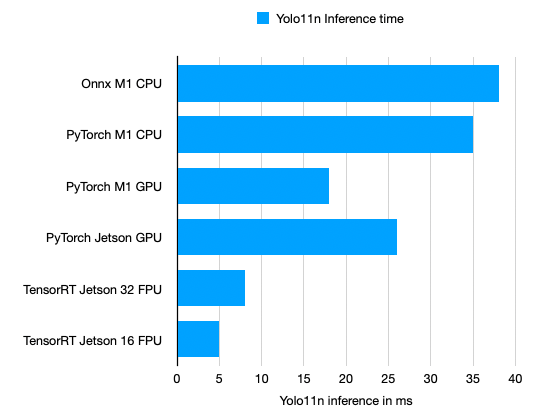
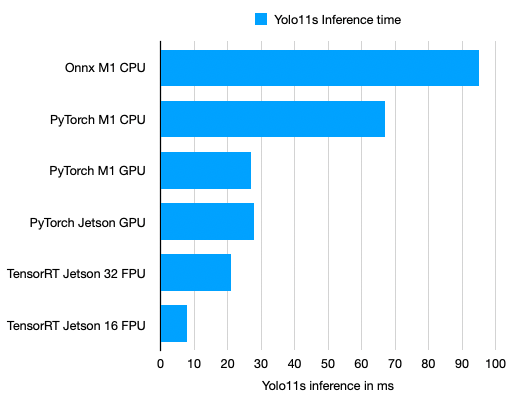
<p>First things first: This is not a fair fight! Running a Deep Neural Network (short <strong>DNN</strong>) on a standard laptop versus on a dedicated platform for accelerating neural networks.
The following measurements show the average inference times.</p>

<p><img src="/docs/assets/images/yolo11n_time.png" alt="YOLO11N Inference Time" /><br />
<em>YOLO11 Nano Inferenece Time</em>\</p>

<p><img src="/docs/assets/images/yolo11s_time.png" alt="YOLO11S Inference Time" /><br />
<em>YOLO11 Small Inferenece Time</em></p>

<p><strong>Key take-aways:</strong></p>

<ul>
  <li>The NVIDIA Jetson Orin Nano achieves faster inference times.</li>
  <li>PyTorch optimizes inference for the M1 GPU making it 2x faster than running on the CPU.</li>
  <li>The inference times can be optimized on the NVIDIA Jetson by using half the floating point precision (FP16).</li>
  <li>On the M1 you cannot use half precision to optimize the runtime.</li>
  <li><em>ONNX</em> format does not run on M1 GPU but only on the CPU.</li>
</ul>

<h2 id="training-on-jetson-nano">Training on Jetson Nano</h2>

<p>It is possible to train the Yolo11 model on the Jetson Nano. However, the RAM is not sufficient for large models or batch sizes. Also for a large number of epochs &gt;20 the training time will be several hours or days.
I would suggest using the Jetson Nano for a quick check if the training data and model work. For training on large data sets and for larger epochs a GPU with more memory and speed is necessary.
The following configurations worked reasonably well:</p>

<ul>
  <li>Yolo11 Nano, Batch size 8</li>
  <li>Yolo11 Small, Batch size 1</li>
  <li>Epochs &lt;20</li>
</ul>

<h2 id="summary">Summary</h2>

<p>The NVIDIA Jetson Orin Nano has the GPU power to run real-time object detection with YOLO11. With a price of only 300€ this is the go to hardware for our real-time detection of sailboats. However, for developing and testing the application the MacBook Air is fast enough and offers more convenience.</p>

<h2 id="outlook">Outlook</h2>

<p>In the next steps the model will be fine-tuned to detect other maritime objects such as buoys, light houses and wind farms.
I will also take a look at how larger models perform on detecting these objects. For training larger models the NVIDIA Jetson Orin Nano
does not have enough RAM. A training on cloud based GPU will be used instead.</p>]]></content><author><name>Niklas Meier</name></author><category term="Other" /><summary type="html"><![CDATA[Introduction]]></summary></entry><entry><title type="html">Works on my Machine - Part 1</title><link href="https://njm08.github.io/2025/09/22/Works-on-my-Machine-part-1.html" rel="alternate" type="text/html" title="Works on my Machine - Part 1" /><published>2025-09-22T00:00:00+00:00</published><updated>2025-09-22T00:00:00+00:00</updated><id>https://njm08.github.io/2025/09/22/Works-on-my-Machine-part-1</id><content type="html" xml:base="https://njm08.github.io/2025/09/22/Works-on-my-Machine-part-1.html"><![CDATA[<h2 id="introduction">Introduction</h2>

<p>Programming is the easy and fun part of being a software engineer. We love writing pretty code and finding creative solutions.
The hard part is maintaining and documenting the infrastructure. As projects grow and include more and more libraries, source code and tools, so does the complexity of just getting everything to run.</p>

<ul>
  <li>So how do we get a new developer to be coding in the first day?</li>
  <li>How do we get our software running on our edge device without spending a week fixing issues?</li>
  <li>How do we prevent solutions from only working on our machine?</li>
</ul>

<p><img src="/docs/assets/images/works_on_my_machine.jpg" alt="Works on my Machine" /></p>

<h3 id="story-time">Story time</h3>

<p>Skip the long story and go straight to the <a href="#best-practices">best practices</a>.<br />
You are starting to work a new project. You download the repository, read the ReadMe and start with step 1. You quickly<br />
realize the ReadMe is hopelessly outdated. Every colleague you ask has a slightly different setup and two days later you are still stumbling from one problem to the next.<br />
You are still not doing what you do best: <strong>Coding!</strong><br />
When it finally does run we are so happy but we forgot about all the steps we did along the way. Maybe we jotted down some notes. Best case we updated parts of the ReadMe. A month later a new employee starts and experiences the same struggle again.</p>

<h3 id="goal">Goal</h3>

<p>This blog introduces best practices in order to speed up and be able to reproduce the set-up of the development environment.
This is based on my experience working on larger embedded software projects.
These tips are not revolutionary. However, your project team will greatly benefit from them.</p>

<h2 id="best-practices">Best practices</h2>

<h3 id="make-it-foolproof-every-click-every-command">Make It Foolproof: Every Click, Every Command</h3>

<p>Document every setup step, as if you were explaining it to someone who has never used a computer.
We often leave out little steps that we think are trivial. No steps are trivial!
It often feels stupid to write down every single little detail, but others will often get stuck on these little details.<br />
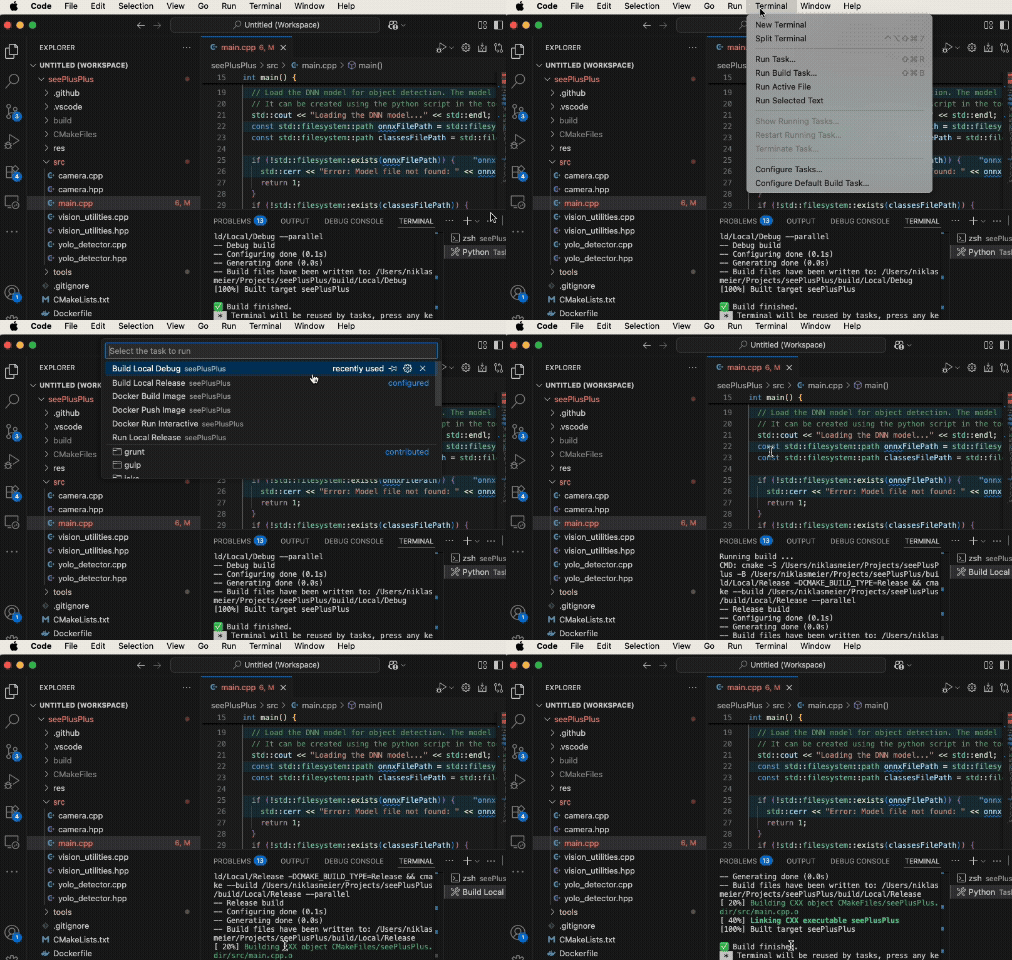
<strong>Pro Tip:</strong> Use GIFs. Everyone loves GIFs and they show exactly where to click and what should happen.</p>

<p><img src="/docs/assets/images/vs_task.gif" alt="Gif showing how to use VS Tasks to build the project." /><br />
<em>Gif showing how to use VS Tasks to build the project</em></p>

<h3 id="scripting-is-documentation">Scripting is Documentation</h3>

<p>Don’t document the commands you execute to setup your environment in the ReadMe. Write a script that executes them. This is the documentation.
Advantages:</p>

<ul>
  <li>Way faster for the next person to run the setup. No need to copy and past everything.</li>
  <li>Scripts are fool-proof. Just run them and let the magic happen.</li>
  <li>All necessary steps must be in the script. In a ReadMe we sometimes forget to document important steps.</li>
  <li>If the scripts don’t run anymore, we fix them. We often forget to update a ReadMe.</li>
</ul>

<h3 id="python-build-scripts">Python Build Scripts</h3>

<p>For compiling projects use <em>Python</em> build scripts. Python is platform independent and easy to write/read.
Again the scripts are also the documentation on how to build the project. A new developer just needs to run the scripts and the project will compile.</p>

<ul>
  <li>Use the <em>pathlib</em> or <em>os</em> package to write platform independent scripts.</li>
  <li>Put the scripts <em>build_debug.py</em> and <em>build_release.py</em> into your tools folder.</li>
  <li>Use the same scripts locally and in your CI-pipeline. This way they are always automatically tested.</li>
</ul>

<p>Your build script could look like this. In a separate python file you code the functions to build the targets.</p>

<pre><code class="language-python"># Build release target.
from build_utilities import BuildTarget, build_project

if __name__ == "__main__":
    build_project(BuildTarget.RELEASE)
</code></pre>

<h2 id="outlook-part-two">Outlook Part Two</h2>

<p>Part 2 will cover containers, Poetry for Python, aliases, VS code tasks and Git submodules.</p>]]></content><author><name>Niklas Meier</name></author><category term="Other" /><summary type="html"><![CDATA[Introduction]]></summary></entry></feed>